Creating Tasks and Accepting Reservations: Accept a Reservation using Assignment Callback Instructions
To accept a Reservation using an assignment instruction, return an accept instruction from your Assignment Callback URL. In this step, you create another Task using the REST API and have your server accept the Reservation as soon as it is notified, via a synchronous HTTP response.
Before you create the next Task, make sure that the Worker Alice is in a non-available Activity state.
Repeat the commands from step 2 to create another Task that only Alice is eligible to handle. Here's our PHP file from earlier:
1<?php2// Get the Twilio-PHP library from twilio.com/docs/libraries/php,3// following the instructions to install it with Composer.4require_once "vendor/autoload.php";5use Twilio\Rest\Client;67// put your Twilio API credentials here8// To set up environmental variables, see https://twil.io/secure9$accountSid = getenv('TWILIO_ACCOUNT_SID');10$authToken = getenv('TWILIO_AUTH_TOKEN');1112// Set your WorkspaceSid and WorkflowSid13$workspaceSid = 'WSXXXXXXXXXXXXXXXXXXXXXXXXXXXXXXXX';14$workflowSid = 'WWXXXXXXXXXXXXXXXXXXXXXXXXXXXXXXXX';1516// instantiate a new Twilio Rest Client17$client = new Client($accountSid, $authToken);1819// create a new task20$task = $client->taskrouter21->workspaces($workspaceSid)22->tasks23->create(array(24'attributes' => '{"selected_language": "es"}',25'workflowSid' => $workflowSid,26));272829// display a confirmation message on the screen30echo "Created a new task";
and the curl command:
1curl https://taskrouter.twilio.com/v1/Workspaces/{WorkspaceSid}/Tasks \2--data-urlencode Attributes='{"selected_language": "es"}' \3-d WorkflowSid={WorkflowSid} \4-u {AccountSid}:{AuthToken}
Before bringing Alice online, open your assignment.php file and modify the existing code to match the following:
1<?php23$assignment_instruction = [4'instruction' => 'accept'5];67header('Content-Type: application/json');8echo json_encode($assignment_instruction);
Instead of returning an empty JSON document as before, we've included an 'assignment instruction' in our response. The 'accept' assignment instruction tells TaskRouter to automatically accept the Reservation and assign the Task to the Worker it has been reserved for.
To kick this process off, we need to transition Alice to an available Activity. With your Workspace open in the TaskRouter web portal, click 'Workers' then click to edit Alice and set her Activity to 'Idle'.
Now, click 'Tasks' in the main navigation, and you should see that the Task has an Assignment Status of 'assigned':
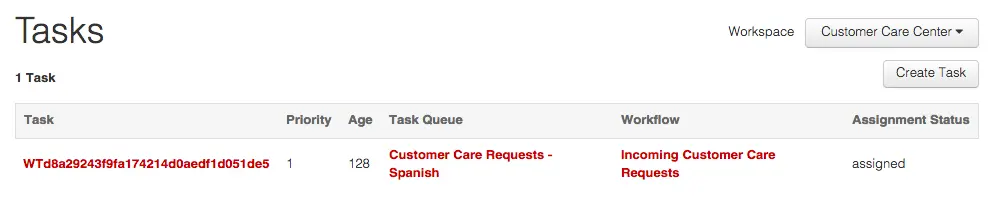
What actually happened is that Alice was reserved for a very short period of time. TaskRouter made a request to your web server at the Assignment Callback URL, and your server told TaskRouter to accept the Reservation. At that point, Alice's Activity transitioned to the 'Assignment Activity' of the TaskQueue that assigned the Task, as it did in the previous step.

You created another Task using the REST API, accepted it via an assignment instruction at your Workflow's Assignment Callback URL, and saw that this immediately accepted the Reservation for the Worker.
Next, learn shortcuts to create Tasks originating from Twilio phone calls.