Create Tasks from Phone Calls using TwiML: Receive an Incoming Call
You can create a TaskRouter Task directly from a Twilio phone call using TwiML instructions. So far in this Quickstart, you've created Tasks using the TaskRouter REST API and accepted Task Reservations using both the REST API and Assignment Callback instructions.
To receive an incoming phone call, we first need a Twilio phone number. In this example we'll use a US toll-free number, but you can use a Voice capable number from any country.
Before purchasing or setting up the phone number, we need to add on to our run.py to handle incoming calls:
1# -*- coding: latin-1 -*-23from flask import Flask, request, Response4from twilio.rest import Client5from twilio.twiml.voice_response import VoiceResponse67app = Flask(__name__)89# Your Account Sid and Auth Token from twilio.com/user/account10account_sid = "{{ account_sid }}"11auth_token = "{{ auth_token }}"12workspace_sid = "{{ workspace_sid }}"13workflow_sid = "{{ workflow_sid }}"1415client = Client(account_sid, auth_token)1617@app.route("/assignment_callback", methods=['GET', 'POST'])18def assignment_callback():19"""Respond to assignment callbacks with an acceptance and 200 response"""2021ret = '{"instruction": "accept"}'22resp = Response(response=ret, status=200, mimetype='application/json')23return resp2425@app.route("/create_task", methods=['GET', 'POST'])26def create_task():27"""Creating a Task"""28task = client.workspaces(workspace_sid) \29.tasks.create(workflow_sid=workflow_sid,30attributes='{"selected_language":"es"}')3132print(task.attributes)33resp = Response({}, status=200, mimetype='application/json')34return resp3536@app.route("/accept_reservation", methods=['GET', 'POST'])37def accept_reservation(task_sid, reservation_sid):38"""Accepting a Reservation"""39task_sid = request.args.get('task_sid')40reservation_sid = request.args.get('reservation_sid')4142reservation = client.workspaces(workspace_sid) \43.tasks(task_sid) \44.reservations(reservation_sid) \45.update(reservation_status='accepted')4647print(reservation.reservation_status)48print(reservation.worker_name)4950resp = Response({}, status=200, mimetype='application/json')51return resp5253@app.route("/incoming_call", methods=['GET', 'POST'])54def incoming_call():55"""Respond to incoming requests."""5657resp = VoiceResponse()58with resp.gather(numDigits=1, action="/enqueue_call", method="POST", timeout=5) as g:59g.say("Para Español oprime el uno.", language='es')60g.say("For English, please hold or press two.", language='en')6162return str(resp)6364if __name__ == "__main__":65app.run(debug=True)
You can use the Buy Numbers section of the Twilio Voice and Messaging web portal to purchase a new phone number, or use an existing Twilio phone number. Open the phone number details page and point the Voice Request URL at your new endpoint:
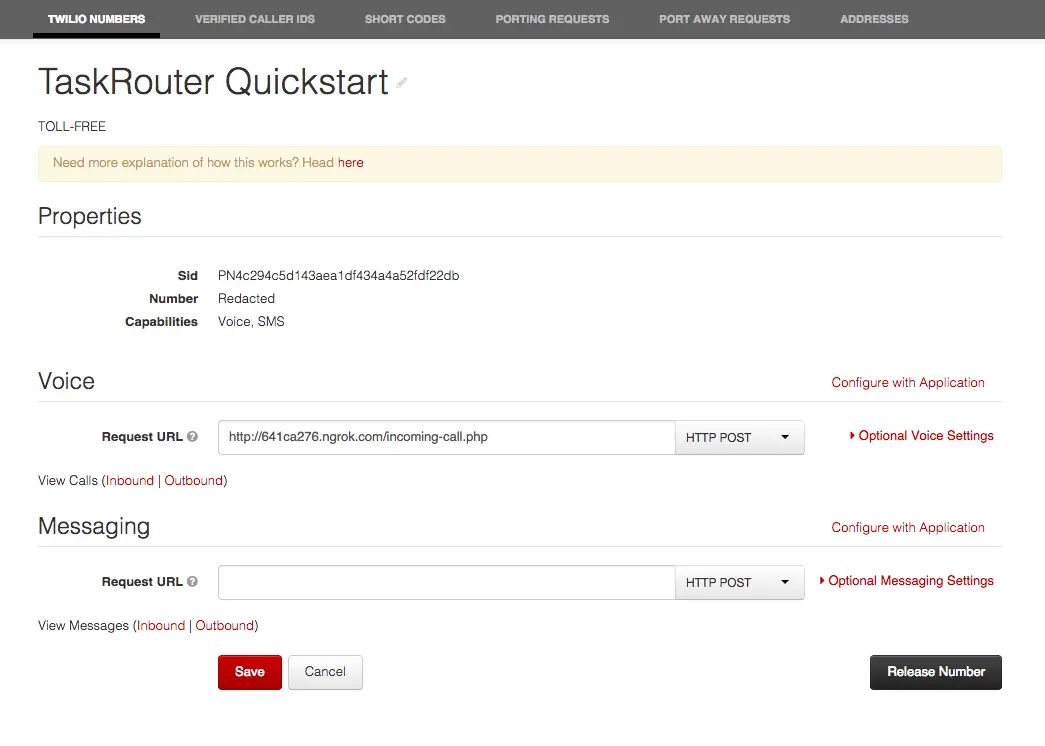
Using any phone, call the Twilio number. You will be prompted to press one for Spanish or two for English. However, when you press a digit, you'll hear an error message. That's because our <Gather> verb is pointing to another endpoint, enqueue_call, which we haven't implemented yet. In the next step we'll add the required endpoint and use it to create a new Task based on the language selected by the caller.